

Chicken Shoot Game Online
Released by InOut Games on March 25, 2026, Chicken Shoot is a single-player instant arcade game focused on quick reactions, visible target multipliers, and rapid-fire round mechanics instead of traditional reels or paylines. The game features an RTP of 94% and is designed in JS/HTML5 format, with demo play and browser compatibility across different devices.
Single-player
94% RTP
Release – 25.03.2026
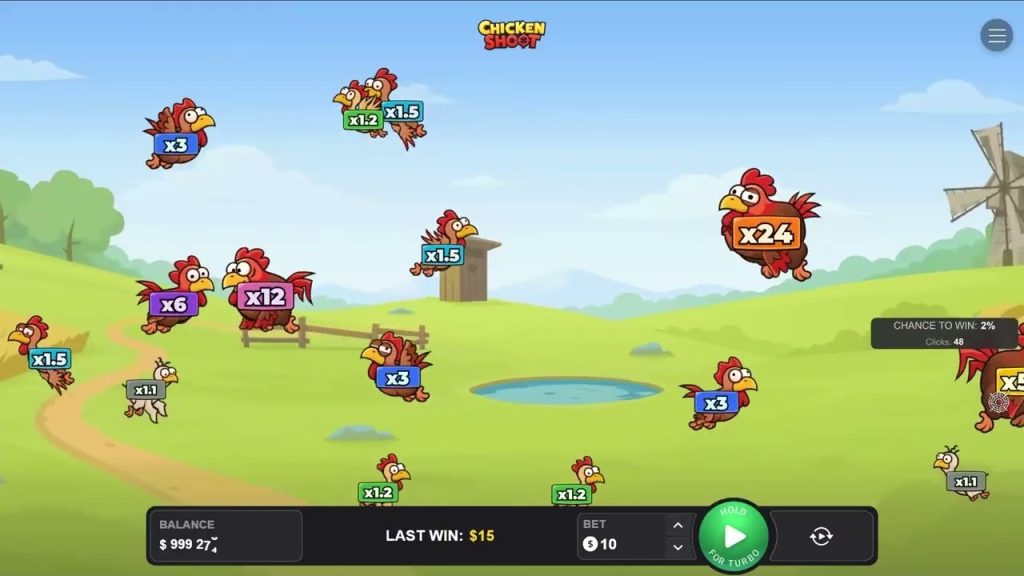
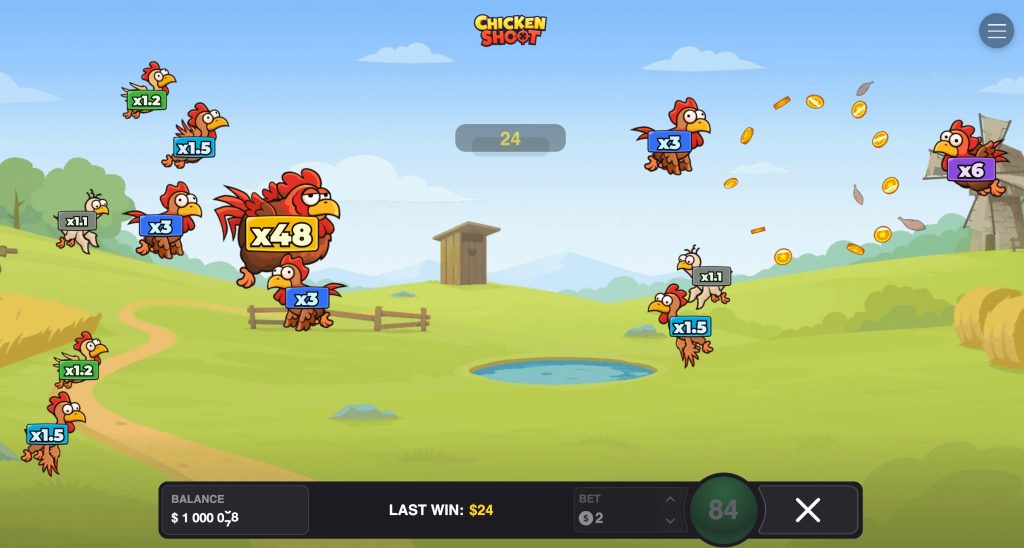
What makes Chicken Shoot stand out is its interactive format. Rather than waiting for symbols to align, the player chooses a bet, follows moving targets on the screen, and decides exactly when and where to shoot. This creates a faster, more action-driven experience that feels closer to an arcade shooter, while each shot still directly determines whether the round ends in a win or a loss.
Reach 20 000 USD in Max Winnings
The maximum possible payout in Chicken Shoot can reach 20,000 USD, with the top multiplier going up to x120 from the original bet. This figure reflects the upper limit of the game’s payout potential, but the actual result in each round depends on the selected bet size, the chosen target, and whether the shot successfully destroys the chicken. Bankroll management is especially important, as frequent shots can quickly increase the total amount wagered over a short session.
Select the Amount Bet Before Each Round
Before every shot, the player chooses the stake for the next round. In Chicken Shoot, 1 round = 1 shot, so the bet is always tied to a single action and a single result.
How it works:
- Set the bet before the round starts.
- The selected amount applies only to the next shot.
- If the shot is successful, the bet is multiplied by the coefficient of the destroyed target.
- If the shot fails and the chicken does not explode, the round ends without a payout.
This system makes bankroll control straightforward because the player always knows exactly how much is being risked on the next action. There is no long spin cycle or hidden sequence: each new shot begins with a new stake decision.
Select Target
After setting the bet, the player chooses what to shoot. Chickens move randomly across the screen, so target selection is one of the main gameplay decisions.
There are two basic ways to interact with targets:
- Manual selection — tap a specific chicken on the screen.
- Automatic selection — use the SPIN button to shoot at a random target or run auto settings.
The important point is that the choice of target affects the possible return for the round. Different chickens have different multipliers, so target selection is directly connected to potential reward and risk. In practical terms, selecting a target means deciding between: lower multipliers that usually represent a more moderate potential return, higher multipliers that can offer stronger payouts but create a more volatile experience.
Target Types
There are different types of chickens flying around the farm, and each type has its own multiplier. The base multiplier range goes from x1.1 to x48. Under the progressive growth mechanic, a target’s value can increase further, with the multiplier progressing up to x120.
| Target characteristic | Value |
| Base multiplier range | x1.1 to x48 |
| Maximum growth potential | up to x120 |
| Screen behavior | Chickens fly randomly |
| Selection method | Manual tap or automatic targeting |
The game combines random target movement with fixed multiplier logic. The player sees targets moving across the farm, but the value of a successful shot depends on the specific chicken selected.
Chicken Shoot Online — Shooting and Rounds
The basic Chicken Shoot gameplay loop is short and easy to understand: place a bet, watch the targets appear, fire, and get an instant result. A successful shot makes the chicken explode and pays the bet multiplied by its coefficient; an unsuccessful one ends the round without a payout.
Because sessions are built from very short cycles, Chicken Shoot online feels especially fast on modern casino platforms. There is almost no downtime between actions, which makes the game accessible for beginners but also easy to play too quickly if the user does not set limits in advance.
Manual Mode
Manual mode gives the player full control over every round. One tap on a chicken triggers one shot, so the player decides both the timing and the target for each individual bet. This mode is best suited to players who want to track multipliers closely and make a fresh decision before every shot.
Key features of Manual mode:
- 1 tap = 1 round
- the player chooses the exact target on screen
- the pace depends entirely on the player
- it is easier to stop, change stake, or switch target strategy between shots
Manual play is especially useful when several chickens with different values are visible at the same time. It allows the player to ignore lower multipliers, focus on isolated targets, or react only when a preferred coefficient appears.
Auto Game
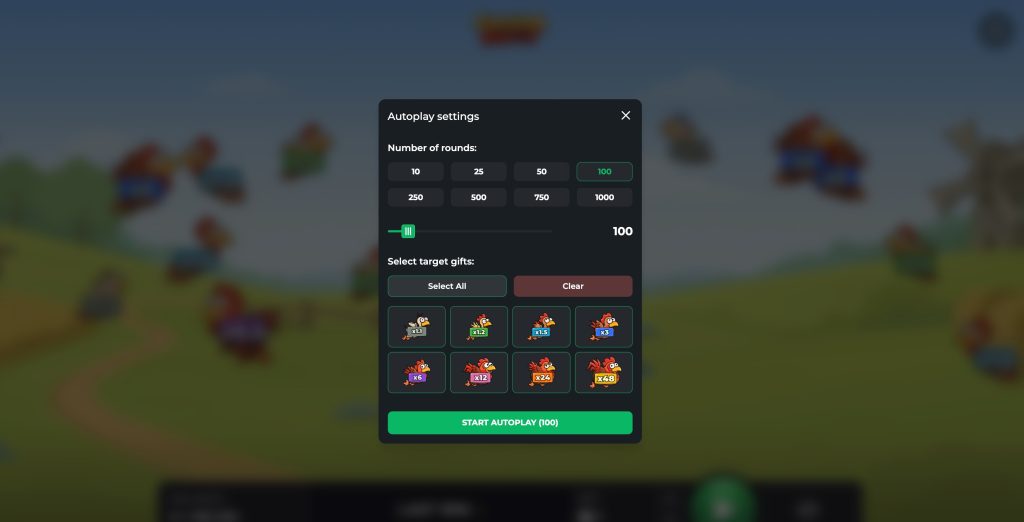
Auto Game is the faster, more system-driven mode. It can be activated through the autoplay function, and the player can also trigger continuous firing by holding the play control after the settings have been prepared. Once activated, the system keeps shooting until the preset sequence ends or the player stops it manually.
| Auto Game setting | Available option |
| Number of shots | 10 to 1,000 |
| Target selection | specific chicken types |
| Target categories | up to 8 target types |
| Stop condition | auto sequence completed or manual stop |
This means Auto Game is not just a basic autoplay switch. The player can define how long the sequence should run and which target categories the system should attack. If target filters are enabled, the game will shoot only at the selected chickens until the bullet count is exhausted.
Progressive Win Growth
One of the more interesting mechanics is Progressive Win Growth. When a target survives repeated hits, its multiplier can begin increasing by a fixed increment after a certain number of failed destruction attempts. The multiplier resets only after that target is finally destroyed.
This feature matters because it changes the risk-reward profile over time. Missing a bird is not always just a dead end; under the right conditions, repeated failures can make the same target more valuable on a later attempt. That adds a small strategic layer to what would otherwise be a pure tap-and-fire loop.
App Chicken Shoot Game Download & Play Mobile Version
Many users search for a Chicken Shoot game download, but the official InOut presentation emphasizes demo/browser access rather than a mandatory standalone app. The title as JS/HTML5 and describe it as available on desktop and mobile browsers. So, if you are looking for Chicken Shoot download options, the practical answer is that mobile play is usually browser-based through a licensed operator or demo page, not necessarily through a separate installer from the developer.
Shoot Chicken Game Demo
Demo mode is the safest way to learn the game structure before using real money. It lets the player test the mechanics, pace, and target behavior without financial risk.
The demo version is useful because the game is built around quick decisions. In one session, a new player can immediately understand:
- how target multipliers differ;
- how fast chickens move across the screen;
- how manual shots feel compared with automatic mode;
- how the Progressive Win Growth mechanic affects risk;
- how often short rounds resolve.
A strong Shoot Chicken game demo section should explain that demo play is not only for beginners. It is also useful for experienced players who want to compare different approaches.
Technical Malfunctions Void all Payouts and Games
This rule is a standard protection clause and should be explained clearly, because it affects how disputed rounds are handled. If a technical malfunction occurs, any result connected to that malfunction is treated as invalid. That includes both payouts and the affected games or plays.
FAQ
Is Chicken Shoot a slot or an arcade-style instant game?
Chicken Shoot is a single-player shooting arcade game with a fast instant-play format rather than a traditional reel slot. It is built around quick actions, direct targeting, and immediate results after each shot.
What is the betting range in Chicken Shoot?
The betting range is from $0.10 to $200 per shot. Since one round equals one shot, the selected stake applies directly to each individual attempt.
Can more than one player join the same session?
No. Chicken Shoot is designed as a single-player game, so each session is played by one user at a time.
Can players verify whether a round was fair?
Yes. Chicken Shoot includes Provably Fair technology, allowing players to check the fairness of a round through the game’s verification tools.
Does the game include bonus rounds or jackpots?
No. The game focuses on its core shooting mechanics, Auto Game mode, and Progressive Win Growth instead of traditional bonus rounds or jackpot features.
How many target types can be selected in Auto Game?
In Auto Game mode, players can choose from 1 to 8 target types. The system will continue firing only at the selected chickens until the preset number of shots is completed or the session is stopped manually.
What technology is Chicken Shoot built on?
Chicken Shoot is built using JS and HTML5 technology, which makes it suitable for browser play on both desktop and mobile devices. The game size is 22.1 MB.
What kind of session length is the game designed for?
Chicken Shoot is designed for short and fast sessions. Its quick rounds, rapid pace, and instant visual feedback make it especially suitable for players who prefer dynamic gameplay.
Does Chicken Shoot have fixed or adjustable variance?
Chicken Shoot uses adjusted variance. This means the game is structured to offer a flexible risk-and-reward balance rather than a strictly fixed volatility model.
Is Chicken Shoot part of a larger InOut chicken-themed lineup?
Yes. Chicken Shoot belongs to a wider chicken-themed lineup from InOut, alongside titles such as Chicken Road, Chicken Road 2.0, Chicken Royal, and Chicken vs Zombies.